

Why You May Not Need an App to Play Mobile Slots

Why You May Not Need an App to Play Mobile Slots

An app icon on your home screen can make mobile slots easy to access, but convenience does not always make an application the best choice. Browser casinos may offer the same basic games without requiring another download.

Whether you Need an App to Play Mobile Slots depends on how frequently you play, how much storage your phone has, and which access method helps you stay secure and in control.

Apps can provide a polished interface, but they may also request permissions and send frequent notifications. Browser play adds less permanent software to your device and can be easier to leave behind after a short demo session.

Apps Offer Quick Access

A dedicated casino app normally creates a permanent icon on your phone. This removes the need to search for the website whenever you want to open the game lobby.

Apps may also support biometric login, saved preferences, account alerts, and customized navigation. These features can be helpful for regular users, but availability differs between operators.

The same easy access can encourage unplanned sessions, especially when promotional notifications appear throughout the day.

Browsers Add Useful Flexibility

A browser lets you open a casino website only when you intentionally visit it. You can bookmark the verified address or create a home-screen shortcut without maintaining a full native application.

Responsive web design allows modern websites to adapt to different devices rather than requiring a separate version for every screen.

For someone who mainly explores free demos, the browser may provide everything needed.

Apps May Request More Permissions

An application can ask for access to notifications, location services, photos, camera functions, or other device features. Some permissions may have legitimate purposes, but every request should match a clear function.

Review the app’s privacy information and phone settings before granting access. A basic casino app should not need your contacts, microphone, or unrelated personal files merely to display slot games.

Browser websites can also request notifications, cookies, and location access, so they are not automatically private. Decline permissions that are unnecessary for your intended activity.

Official App Stores Apply Specific Rules

Apple requires real-money casino apps to hold the necessary licences and permissions, operate only in authorized locations, and remain free to download through the App Store.

Google Play permits real-money gambling applications in selected markets when developers complete its approval process and demonstrate appropriate licensing. Approved apps must also comply with age and geographic restrictions.

These policies reduce certain risks, but they do not make every platform suitable for every user or country.

Browser Websites Still Need Verification

A browser avoids unofficial app files, but it introduces phishing risks. A copied website may imitate a known casino and use a slightly altered domain name.

Open the site through a verified bookmark or type the correct address yourself. Do not sign in through unexpected links sent by text message, email, or social media.

Check the operator’s licence with the relevant local regulator rather than trusting a logo displayed on the page.

Consider Storage, Battery, and Updates

Casino applications occupy dedicated space and may grow after updates. Browser sites mainly use temporary cache, cookies, and website data.

An app may provide smoother menu navigation, while browser performance depends more heavily on page optimization and connection quality. Neither format is always faster.

Both can consume battery and mobile data when displaying detailed graphics, animation, and sound. Reduce brightness and close heavy background applications when your phone becomes warm or sluggish.

Choose the Format That Supports Control

Mobile gambling can be opened quickly and privately, making personal limits important. British remote-gambling standards, for example, require operators to provide facilities that allow customers to set financial limits suited to their circumstances.

Use available deposit limits, transaction histories, and session reminders before real-money play. Browser users should not assume these tools are missing simply because no app is installed.

The best format is the one that makes limits and account settings easy to find while reducing impulsive access.

You may not Need an App to Play Mobile Slots when a secure, responsive browser version is available.

Browser casinos save permanent storage, simplify occasional demo play, and avoid installing extra software. Official apps may offer faster access, biometric login, and a customized interface for regular users.

Compare both formats before deciding. Review app permissions, inspect the website domain, verify local licensing, and check whether financial controls are easy to use.

Begin with free play to test performance and screen compatibility. Choose the option that provides the greatest security and control, not simply the fastest route to the spin button.
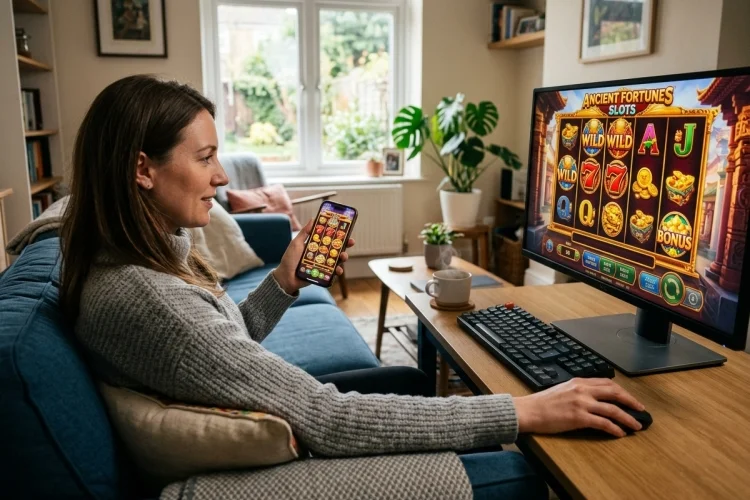
Mobile Slots vs Desktop Slots: How to Choose the Right Setup

Mobile Slots vs Desktop Slots: How to Choose the Right Setup

Choosing a device for online slots may seem like a minor decision, but it can change how you interact with the game.

A phone encourages quick access and touch-based play, while a desktop creates a more fixed and spacious environment.

The best answer to Mobile Slots vs Desktop Slots depends on what you want to do. Someone testing a simple demo during a short break may prefer mobile.

Another person comparing paytables, themes, and bonus mechanics may appreciate a desktop monitor. This guide matches each platform with different needs so you can select the more comfortable and practical option.

Choose Mobile for Portability

Mobile slots are convenient when you do not want to remain in one room. A phone can open a browser game without requiring a computer or large workspace.

Responsive web design is intended to make pages display effectively across phones, tablets, and desktops. When implemented properly, it rearranges navigation and game controls for the available screen.

Mobile is particularly suitable for briefly testing a demo or checking whether you like a game’s visual style.

Choose Desktop for Detailed Exploration

A desktop is useful when you want to read a full paytable, compare several games, or review account settings carefully. Large screens reduce the need to hide information behind compact menus.

The mouse also makes small controls easier to select. You can open additional tabs for terms, payment rules, or safer-gambling tools without covering the game completely.

Desktop play is therefore a strong option for research and deliberate decision-making rather than instant access.

Consider Your Physical Comfort

Holding a phone for a long period can strain the hands, neck, or eyes. Small text may also become uncomfortable to read.

A desktop monitor can be positioned at eye level, although sitting in one position for too long has its own disadvantages. Whichever device you use, adjust brightness, maintain a comfortable viewing distance, and take regular breaks.

Mobile-accessibility guidance emphasizes readable responsive layouts and controls that work effectively with touchscreens.

Tablets Offer a Middle Ground

A tablet combines touch controls with a larger display. It is less portable than a phone but easier to carry than a desktop system.

For players who dislike tiny mobile symbols but still value flexibility, a tablet may provide the most balanced experience.

Think About Privacy and Shared Devices

A personal phone may feel private, but notifications can reveal app names or promotional messages on the lock screen. Disable gambling notifications when they are unnecessary or uncomfortable.

A shared desktop creates a different risk. Saved passwords, browsing history, or payment details may remain accessible to other users.

Use a unique password, avoid saving financial details on shared devices, and sign out after every session. Never let convenience weaken basic account security.

Check App and Browser Availability

Desktop players usually access games through a browser. Mobile users may choose between a browser and an app.

Apple permits real-money casino applications only when they have the required licences and geographic restrictions. Google Play also limits gambling applications to approved countries and licensed operators.

An unavailable app is not an invitation to install an unofficial file. Use the verified browser version instead or choose another legal platform.

Use Demo Mode to Compare Devices

The easiest way to choose is to open the same free demo on both devices. Examine how quickly it loads, whether the symbols remain clear, and how easily you can reach the paytable.

Free-play games offered alongside paid versions in regulated British facilities must use the same rules and accurately represent the likelihood and distribution of prizes in the corresponding real-money game.

Demo mode is useful for comparing interfaces, but virtual results should not be treated as predictions.

Consider Which Device Supports Better Limits

Convenient mobile access can encourage frequent unplanned sessions. Desktop use may require more deliberate effort, although it can still become lengthy.

Choose the device that makes it easier to follow your boundaries. Reality-check facilities are designed to help users monitor how long a gambling session has lasted. Financial-limit tools can also restrict deposits or spending over a defined period.

Set these controls before playing rather than after reaching your intended limit.

The Best Device Is the One You Control

Mobile is better for portability, while desktop is better for space and detailed navigation. Neither platform changes the underlying mathematics of a regulated random game.

The right setup is the one that remains readable, secure, comfortable, and easy to stop using.

There is no single winner in Mobile Slots vs Desktop Slots. Mobile works well for portability, touch controls, and quick demo access.

Desktop is preferable for large game layouts, accurate navigation, multitasking, and reading detailed information. Compare both formats using free play before choosing one for regular use.

Check loading performance, security, screen comfort, and access to limit-setting tools. Avoid unofficial applications and remember that switching devices cannot improve random odds.

Select the platform that supports deliberate decisions, establish clear time and financial boundaries, and close the game when it no longer feels like relaxed entertainment.